2025 숭실대학교 해킹방어대회에 참여했다
포너블은 거들떠도 안봐서 모르겠고 최소한 웹은 생각보다 어렵게 나왔다
종합 28등, 일반부 17등 했는데 팀원들이 너무 잘해줘서 생각보다 잘 나온거 같다
우리팀은 misc만 미친듯이 풀었다
Mazer (Reversing)
exe 파일이랑 게임 이미지 에셋만 달랑 주길래 치트엔진으로 푸는건가 싶어서 바로 던지려했다
근데 자세히 보니 exe에 파이썬 로고가 박혀있었고 파이썬으로 작성된 프로그램을 exe로 돌린거란걸 알 수 있었다
pyinstxtractor를 사용해 pyc파일로 추출해주고 이를 다시 한 번 디컴파일해서 원문 python 코드를 얻을 수 있다
import pygame
import sys
import random
import hashlib

def xor_image_hash(frog_path, wall_path, floor_path, statue_path):
    hasher = hashlib.sha256()
    with open(frog_path, 'rb') as f:
        hasher.update(f.read())
    with open(wall_path, 'rb') as f:
        hasher.update(f.read())
    with open(floor_path, 'rb') as f:
        hasher.update(f.read())
    with open(statue_path, 'rb') as f:
        hasher.update(f.read())
    return hasher.hexdigest()[:16]

def make_flag():
    frog_file = 'chill.jpeg'
    wall_file = 'wall.jpg'
    floor_file = 'tile.jpg'
    statue_file = 'flag.png'
    result = xor_image_hash(frog_file, wall_file, floor_file, statue_file)
    flag = 'ssu{' % result + '}'
    return flag
플래그를 만드는 부분이 보인다
이 부분만 때서 그대로 돌려주면 플래그를 얻을 수 있다
flag: ssu{236501dfe16b611f}
meme (Misc)
https://sepolia.etherscan.io/address/0xc48bdba1481c391cf67249818d2e972f737976d8#code
etherscan 링크를 준다.
contract Ssumeme {
    address public owner;
    string private flag;

    constructor() {
        owner = msg.sender;

        uint256 blockHashPart = uint256(blockhash(block.number - 1)) % 1000000000;
        flag = string(abi.encodePacked("ssu{", uint2str(blockHashPart), "_m3m3}"));
    }

    function getFlag() public view returns (string memory) {
        require(msg.sender == owner, "Only the contract owner can access the flag. Contact to soongsil.asc@gmail.com :)");
        return flag;
    }

    function uint2str(uint256 _i) internal pure returns (string memory) {
        if (_i == 0) {
            return "0";
        }
        uint256 j = _i;
        uint256 length;
        while (j != 0) {
            length++;
            j /= 10;
        }
        bytes memory bstr = new bytes(length);
        uint256 k = length;
        while (_i != 0) {
            k = k - 1;
            uint8 temp = (48 + uint8(_i - _i / 10 * 10));
            bytes1 b1 = bytes1(temp);
            bstr[k] = b1;
            _i /= 10;
        }
        return string(bstr);
    }
}
Solidity라는 프로그래밍 언어인거 같은데 누가봐도 저 flag가 수상해보인다
block_hash = 0x3fd4e38b9b28cfe753436b3277eec250ffe435894957cc15ac493d864d1e0c29
block_hash %= 1000000000
print(block_hash)
블록해시값 찾아서 넣은 다음에 계산 때려주면 된다
flag: ssu{809209385_m3m3}
compressor (Misc)
import gzip
import hashlib
import os

def main():
    with open(__file__, 'r') as f:
        print(f.read())

    print('\n'+'='*50+'\n')

    data = input('Your gzip (hex) >>> ')

    try:
        data = bytes.fromhex(data)
        d_data = gzip.decompress(data)
    except (ValueError, gzip.BadGzipFile):
        print('Nah...')
        exit()


    origin_hash = hashlib.sha256(data).hexdigest()
    print(f'{origin_hash=}')
    decomp_hash = hashlib.sha256(d_data).hexdigest()
    print(f'{decomp_hash=}')

    if origin_hash == decomp_hash:
        print(os.environ.get('FLAG', 'dummy_flag'))

if __name__ == '__main__':
    main()
원래 data와 gzip으로 decompress한 데이터의 해시가 같으면 flag를 준다
아무것도 입력 안하면 두 해시가 같기에 그냥 엔터치면 나온다
flag: ssu{have_you_heard_about_the_quine?}
ssu shell (pwnable)
받은 인풋을 그대로 echo 해주는 프로그램이다.
몇몇 문자열이 필터링 되기에 명령어를 치환해서 넣어야한다
백틱(`)은 들어간다는점을 이용해
이렇게 써주면 플래그를 읽을 수 있다
'`cat ?lag_*`'
ssu{57833e5cc254ed0b54fc7f258ae75081657f181d9776ea171b283b426967ab26}
Check the target
import pickle
import numpy as np
import torch
import torch.nn as nn
import base64
import io
from PIL import Image
import os

class CustomModel(nn.Module):
    def __init__(self):
        super(CustomModel, self).__init__()
        self.hidden1 = nn.Linear(784, 256)
        self.hidden2 = nn.Linear(256, 128)
        self.output = nn.Linear(128, 10)
        with torch.no_grad():
            self.hidden1.weight[0] = torch.ones(784)*0.1
            self.hidden1.bias[0] = 0.1
            self.hidden2.weight[0] = torch.ones(256)*0.2
            self.hidden2.bias[0] = 0.2

    def forward(self, x: torch.Tensor) -> torch.Tensor:
        x = torch.relu(self.hidden1(x))
        x = torch.relu(self.hidden2(x))
        return torch.softmax(self.output(x), dim=1)

def modelLoad(path):
    model = CustomModel()
    weights = torch.load(path)
    model.load_state_dict(weights)
    model = model.eval()
    return model

def preprocess(x:str) -> torch.Tensor:
    image_data = base64.b64decode(x)
    image = Image.open(io.BytesIO(image_data))
    tensor = torch.tensor(np.array(image)).float().view(1, -1)
    return tensor

def predict(model, x):
    with torch.no_grad():
        out = model(x)
        prediction = out.argmax().item()
        confidence = out.max().item()

    return out,prediction, confidence

if __name__ == "__main__":
    model = modelLoad("weights.pkl")
    x = input("[*] Enter the image data(base64): ")
    x = preprocess(x)
    criterion = nn.CrossEntropyLoss()
    out,prediction, confidence = predict(model, x)
    loss = criterion(out, torch.tensor([7]))
    max_length = max(
            len(f"Prediction : {prediction}"),
            len(f"Confidence : {confidence}"),
            len(f"Loss       : {loss.item()}"),
        )
    print("╔" + "═" * (max_length + 4) + "╗")
    print(f"║  Prediction : {prediction:<{max_length - 13}}  ║")
    print(f"║  Confidence : {confidence:<{max_length - 13}}  ║")
    print(f"║  Loss       : {loss.item():<{max_length - 13}}  ║")
    print("╚" + "═" * (max_length + 4) + "╝")

    success = prediction == 7 and confidence > 0.98
    if success:
        print("[*] Success!", os.environ.get("FLAG", 'dummy_flag'))
    else:
        print("[*] Failed!")
        exit(1)
'|'만 입력해도 풀리는 언인텐이 있던 문제이다
import torch
import numpy as np
from PIL import Image
import base64
import io

# 모델 초기화
class CustomModel(torch.nn.Module):
    def __init__(self):
        super(CustomModel, self).__init__()
        self.hidden1 = torch.nn.Linear(784, 256)
        self.hidden2 = torch.nn.Linear(256, 128)
        self.output = torch.nn.Linear(128, 10)

    def forward(self, x: torch.Tensor) -> torch.Tensor:
        x = torch.relu(self.hidden1(x))
        x = torch.relu(self.hidden2(x))
        return torch.softmax(self.output(x), dim=1)

# 가중치 로드
weights_path = "weights.pkl"
weights = torch.load(weights_path, map_location=torch.device('cpu'))

# 모델 설정
model = CustomModel()
model.load_state_dict(weights)
model.eval()

# 조건을 만족하는 입력 데이터 생성
def generate_input(model, target_class=7, confidence_threshold=0.98):
    input_tensor = torch.rand(1, 784)  # 임의의 초기 입력값
    input_tensor.requires_grad = True

    optimizer = torch.optim.Adam([input_tensor], lr=0.1)

    for _ in range(1000):  # 최대 1000번 반복
        optimizer.zero_grad()
        output = model(input_tensor)
        confidence = output[0, target_class]
        loss = -confidence  # 타겟 클래스의 확률을 최대화
        loss.backward()
        optimizer.step()

        with torch.no_grad():
            input_tensor.clamp_(0, 1)  # 이미지 데이터는 [0, 1] 범위로 제한

        if confidence.item() > confidence_threshold:
            print(f"조건 만족: 클래스 {target_class}, 신뢰도 {confidence.item()}")
            break

    return input_tensor

# 입력 데이터 생성
input_data = generate_input(model)

# 이미지로 변환
image_array = (input_data.view(28, 28).detach().numpy() * 255).astype(np.uint8)
image = Image.fromarray(image_array)
image.save("generated_image.png")

# 베이스64 인코딩
buffer = io.BytesIO()
image.save(buffer, format="PNG")
base64_image = base64.b64encode(buffer.getvalue()).decode()

print(f"Base64 Encoded Image:\n{base64_image}")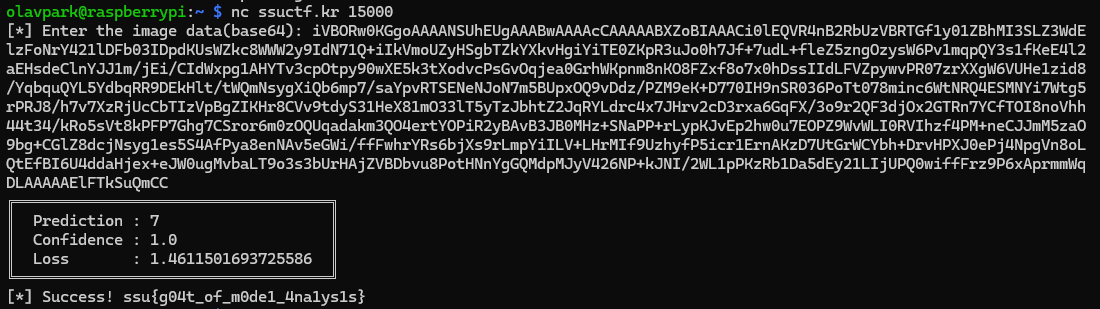
flag: ssu{g04t_of_m0de1_4na1ys1s}